
Make time for work with an assistant
Having to work longer hours to finish your work?


Getting continuous space and time was hard while you’re working from an office, and for some people, it’s even harder while you’re working from home. You’ll often start the day feeling motivated and by evening you realise you’ve accomplished nothing.
This post is meant to provide you with practical advice on how to manage your time better. I’ve learnt these the hard way, managing five teams directly and some of the tricks mentioned below have prevented things from spiralling out of control.
Before I get into my tricks, here’s a quick recap of things you must’ve already read about so I’m not going to be discussing these:
Quit social media
Take out blocks of time for your work
Turn off notifications
No meeting day - (yeah right!)
Look at emails/messages only twice a day at a fixed time
Some of the above methods are useful and I use them when required but they weren’t sufficient for me. The ideas listed below made a real difference. So here goes!
The Trick
There’s only one trick to getting stuff done and that’s by free-ing up mental space for actually doing the work.
Here are the two things you need to do to accomplish this:
Remove decision-making from the equation as soon as possible - Your brain consumes the maximum amount of energy in your body. The more time you are spending deciding on what needs to be done, the more energy you are sapping from your body and wasting time.
Create an assistant for yourself - Build a workflow that closely resembles what an assistant would do for you. What do assistants do? They manage your time, follow up on your behalf, do the repetitive manual work etc.
Planning your work
You must have guessed that the way you remove decision-making is to plan out your work. The question then is, for what timeframe do you plan for and how should you plan your work?
I plan for a week, which is long enough that I have enough time to plan out my work over multiple days. This gives me a real shot at finishing what I've planned for. It’s also not that long a timeframe that if something new does come to me, I can give a reasonable timeframe of completion without messing my schedule. Most tasks are never that urgent that the requestor can’t wait a few days.
So every Monday I spend 30 mins deciding the week’s priority which makes the rest of the week a no-brainer. It also gives me enough time to schedule meetings well ahead of time which guarantees that work that requires other’s input will get done.
How do you plan what needs to be done? It doesn't need to be hard. It can easily be wrapped up within those 30 mins. Ideally, whenever someone asks you to do something (and you accept), come straight to your to-do list and add it there. Don’t worry about figuring out which day, what time, etc.. Use next week’s planning time to figure that out.
A bunch of questions may come to your head now. What if:
They ask ‘By when will it get done?’ - just respond “expect it by next week”. If you determine that this is important, bump the priority down of a relatively lesser important item from the current week’s to-do list and assign a higher priority for the new item.
They say, ‘I can’t wait that long!’ - Delegate to a peer and let them deal with the problem instead of you.
You feel, ‘I’m not in a position where I can delegate’ - Wrong! You can always delegate to your manager! Throw the problem at the manager and let her decide what’s important. That’s their job. That way, you don’t need to kill yourself working overtime to accomplish two things when you only have time for one.
Prioritising your work
Assigning the priorities to work is usually well understood. You get a feel for it when you hear about the task. However, you need to be a bit careful about not assigning a high priority to everything otherwise you’ll end up spending your time doing ad-hoc work again rather than important work. Therefore, critically examining your task list is essential. Here’s the order in which I go when planning out my week:
Dependencies - Work that’s dependent on you that’s blocking others.
Deadlines - Work with a clock on it.
Decisions - Discussions required to make progress on projects of your team.
Planning - Projects that you know will execute smoother if you plan it out better
Execution - Put your head down and work. This should be where you spend your maximum time. This is the ‘Deep Work’ time.
People - 1:1 time, mentoring etc
Reading - Make time to upskill
Not every week you’ll have work from each of the categories above.
With the right planning and prioritisation, you should solve for decision-making. Now comes the fun part - making time for your work.
The Assistant
The purpose of employing an assistant is so that you can offload extraneous, non-creative tasks to them and they can get it done for you instead. Since those things are off your plate, you are mentally free to spend that time in a deep work state.
Creating an assistant is basically about using the tools at your disposal the right way. Use your tools to create a workflow that ensures you only need to think about something when you really really need to think about it.
Create a dashboard
Use a dashboard as an assistant that says to you, ‘Hey, you need to get this done!’.
Notion has this fantastic thing called “Databases”. It’s basically an excel sheet with filters and sorting. One of the cool things you can do with it is to create a live dashboard for yourself. Here’s an example dashboard of mine that has 3 sections: Priorities, People, Projects.
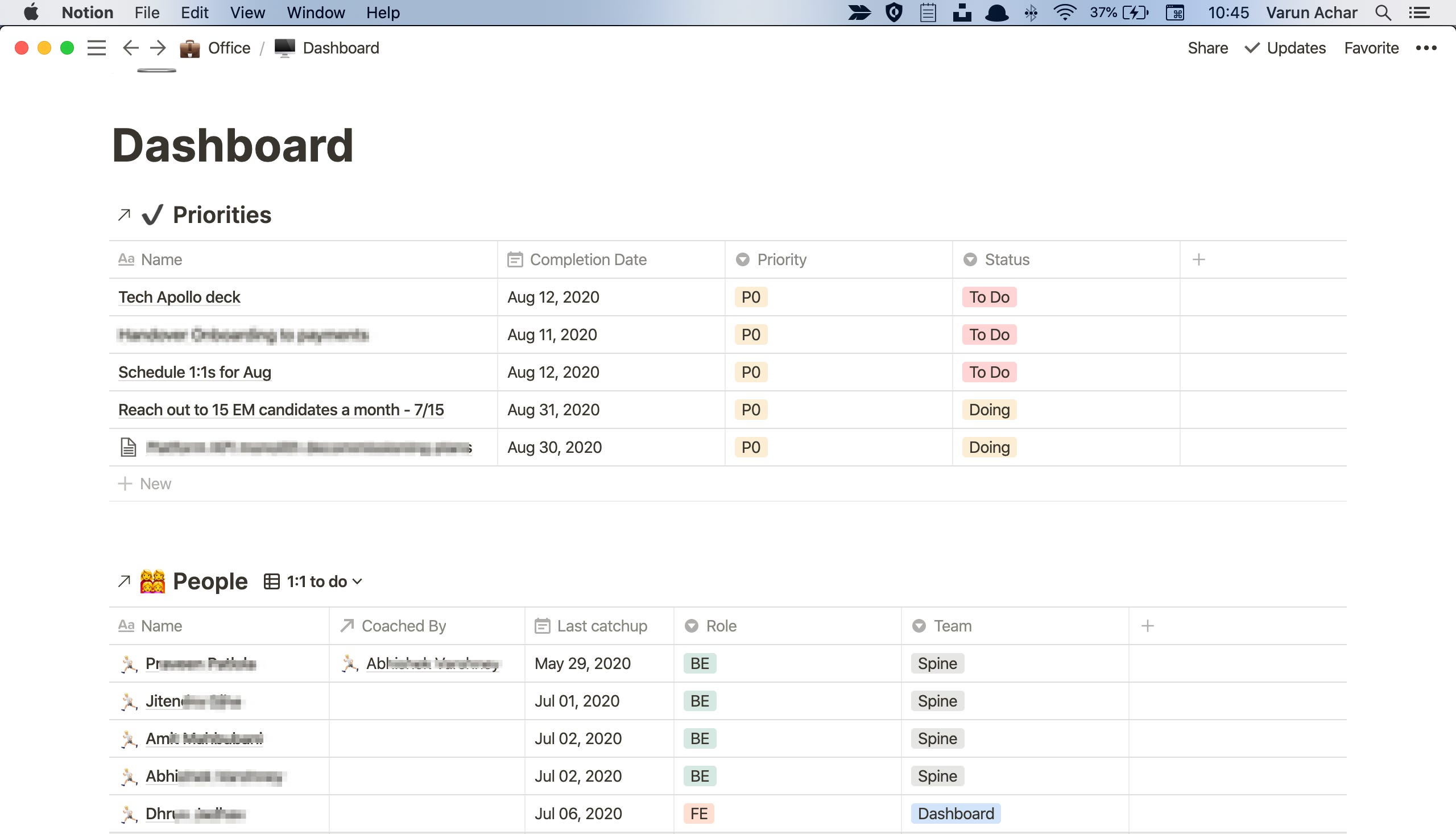
The dashboard is set up in a way that automatically changes every morning because the filters applied show the most important tasks that need to be done or those which have a deadline in the next week. The People section shows who I need to meet in the current week and that helps me make sure that I’m meeting them on time.
Use your calendar
Once you know what needs to be done at the start of the week, block out times in your calendar. If you block your own calendar, you can block out continuous blocks of space for getting stuff done thereby limiting context switches. If you don’t block your calendar, somebody else will.
Of course, if there are things you need to do repeatedly, like sending a report, staff meetings etc, schedule them as recurring activities on the calendar.
Use a calendar management tool
Using a tool like Reclaim.ai can help you protect your time while giving flexibility to others to schedule time in your calendar as well. For example, say you want to take a 30 min coffee break in the evenings every day between say 4-5:30 PM. Using Reclaim, you can set this up. By default, Reclaim will block your calendar at 4 PM every day, and in case someone sends you a 1 hr meeting invite for 4 and you accept that meeting, Reclaim will automatically move the coffee break to 5-5:30 in your calendar. Reclaim will then automatically reject any other meeting that gets scheduled from 5-5:30 since that’s the last available slot left for your coffee break.
Set auto declining hours
When you set OOO on your calendar, it automatically declines any meeting request sent to you in those hours. Auto declining is awesome since the hardest thing to do is to actually decline a meeting. By auto declining, you remove the psychological pressure associated with declining. You can use a tool like Reclaim to set up a few hours daily where meetings get auto declined, giving you the freedom to work without interruption.
Inbox Zero
Treat your email as a task list. Things that you need to address at that time stay in the mailbox, everything else gets archived. Archiving the email clears it from your inbox and moves it into the ‘Archived’ folder. To find archived emails, simply search for them. With the emails cleared away, the list becomes a very manageable task list.
Below is my actual Inbox from work.
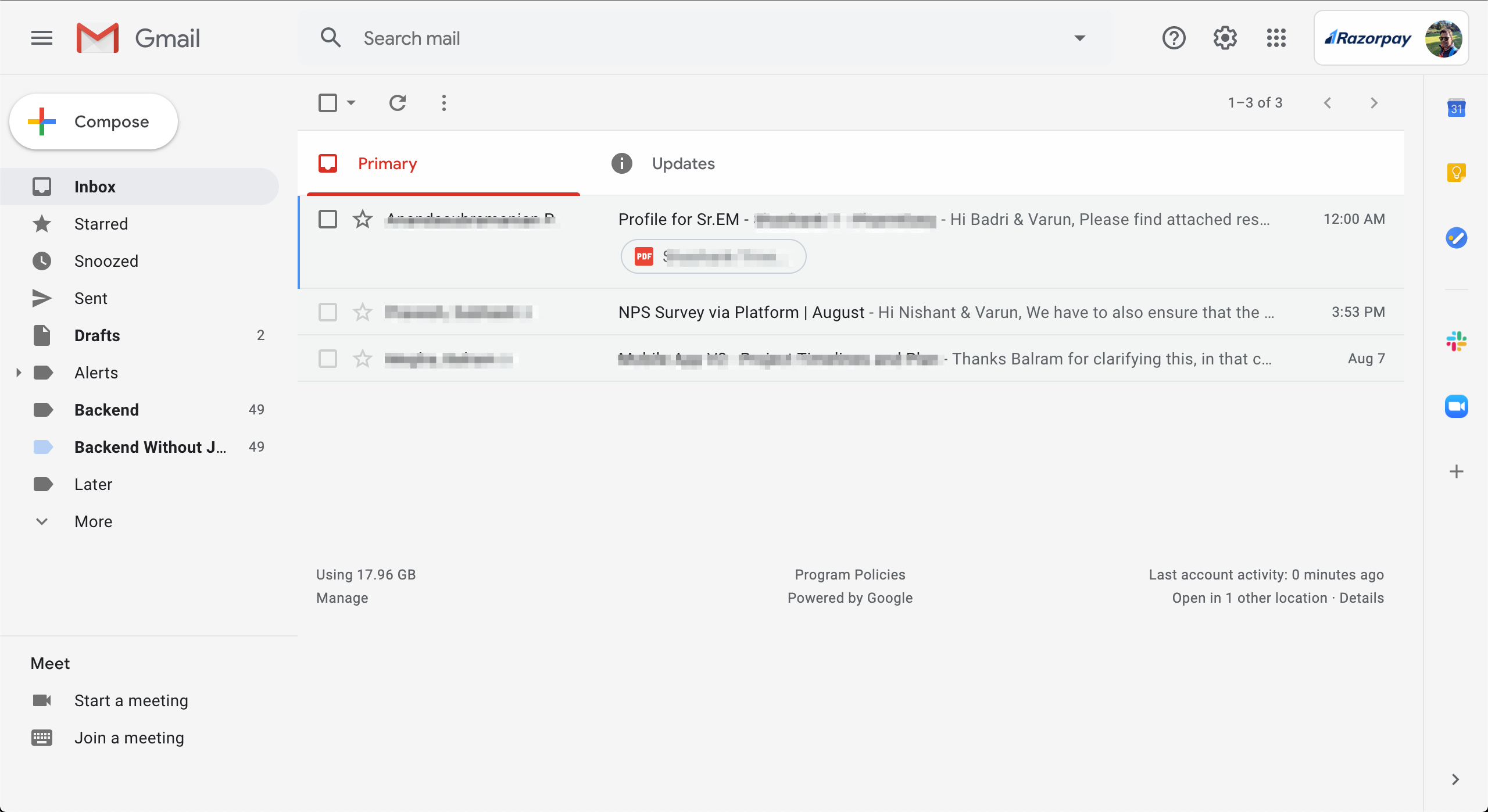
Pro tip: Have 4000 unreads already? Begin by archiving all emails except from the last 1 week. Just do it, you won’t miss anything, trust me.
Snooze it
Not everything needs to be addressed immediately, be it a message sent over slack or an email. Snoozing an item clears it of your immediate mental space to a later point of time where you do have the space to deal with it. The snoozes can range from later in the day up to the end of the week. Doesn’t matter. The priority determines the duration of the snooze. Use this for follow-ups as well.
Pro Tip: Learn the shortcuts for your mail client to quickly move through emails by either archiving or snoozing them.
Automate the boring
One of the things that I need to do in my current job is to write an email with weekly updates on the progress made and to provide screenshots of metrics of the different systems that my team manages. Unfortunately, the tool we currently use doesn’t allow me to create a single dashboard with all the metrics in one place hence I had to move between 15+ pages taking screenshots of different graphs and sticking them into a document. This was extremely boring work and didn’t seem the right value of my time. So I spent a couple of hours automating the whole process of taking screenshots using a tool called Keyboard Maestro.
You can automate stuff to help you get better at your job. For example, as a manager I need to keep tabs of all the bugs and security vulnerabilities currently open against my products, so creating an automated mechanism to collect this information and keep it ready for my review every Monday will be very handy.
Simple automation can help you safe countless hours which you can then spend productively doing something meaningful.
Making it count
Of course, none of this helps if you spend the time watching clips of your favourite movie in the time you’ve finally created for yourself or you constantly keep checking your Slack for messages that you are craving to respond to. Congratulations, your past situation has resulted in you probably suffering from mild Attention deficit disorder (ADD). Try mindfulness techniques to recover from this. Or maybe turning off those Apps isn’t such a bad idea after all?
Cheers.
Know other coping mechanisms? Leave a comment!
Have 4000 unreads already? Begin by archiving all emails except from the last 1 week. Just do it, you won’t miss anything, trust me. Was top notch :-)
Reclaim.ai seems interesting